
Draw flag football plays with your AI assistant
Design a play, defend an attack or improve what you run with ChatGPT, Claude or another assistant you already use. Get a coaching explanation, then bring its ReadyRef play code back to draw the adjustments, check them and watch them run. No connector or ReadyRef sign-up needed. Your assistant's own limits apply.
Describe your playCopy out, bring your play back
- Open Describe your play, choose design, defend or improve and your format, then describe the situation. You can paste a coaching question from an online discussion. Include any league rules that affect the answer.
- Choose Copy & open ChatGPT or Copy & open Claude. Paste the prepared prompt into the chat. You can also copy it for another AI.
- Your assistant explains the problem and suggests adjustments with player responsibilities and tradeoffs. Answer any follow-up questions, then copy the complete ReadyRef play code it returns for the diagrams.
- Return to Bring your play back and paste the code. Preview the drawing and rule checks, then add it to your playbook. The import is undoable.
Keep the full coaching explanation in your AI chat; diagrams store short notes and player cues. Defensive instructions such as waiting for a runner to commit are coaching cues, and the simulation may only approximate them. Nothing is generated by a paid AI service on ReadyRef's side. Drawing and checking the pasted code happen in your browser. If the code needs fixing, Copy correction for your AI gives your assistant the details to repair it.
Optional: connect for direct draft links
If you prefer your assistant to call ReadyRef directly and return a draft link, use our free MCP connector instead.
https://readyref.app/mcpThe connector is optional. No ReadyRef key or account needed.
Claude
- Open Settings, then Connectors.
- Choose Add custom connector.
- Name it ReadyRef Play Maker and paste
https://readyref.app/mcpas the URL. Leave the sign-in fields empty. - In a chat, turn the connector on from the tools menu and ask for a play.
ChatGPT
- Turn on developer mode in ChatGPT's settings (it's in the advanced connector settings on plans that offer it).
- Add a new connector with
https://readyref.app/mcpas its URL and no authentication. - Pick the connector in a chat and ask for a play.
Other assistants
Anything that can add an MCP server by URL works the same way. Tools that call web APIs instead can use the OpenAPI description.
Your organization's admin may need to allow custom connectors on work or school accounts.
Things to ask
Say the format, the formation, what each player runs and the defense. The more you say, the less the assistant has to guess. It tells you anything it had to change.
How can we defend a 5v5 direct snap to a WR, then a backward pitch to an RB who can run or throw? We contain the RB near a sideline. Explain two adjustments, what each gives up, and which league rules you need before drawing the defense.
Improve our 5v5 play against man coverage: two wide receivers run deep and the center runs a short out, but the center is always covered. Suggest simple adjustments and draw the options.
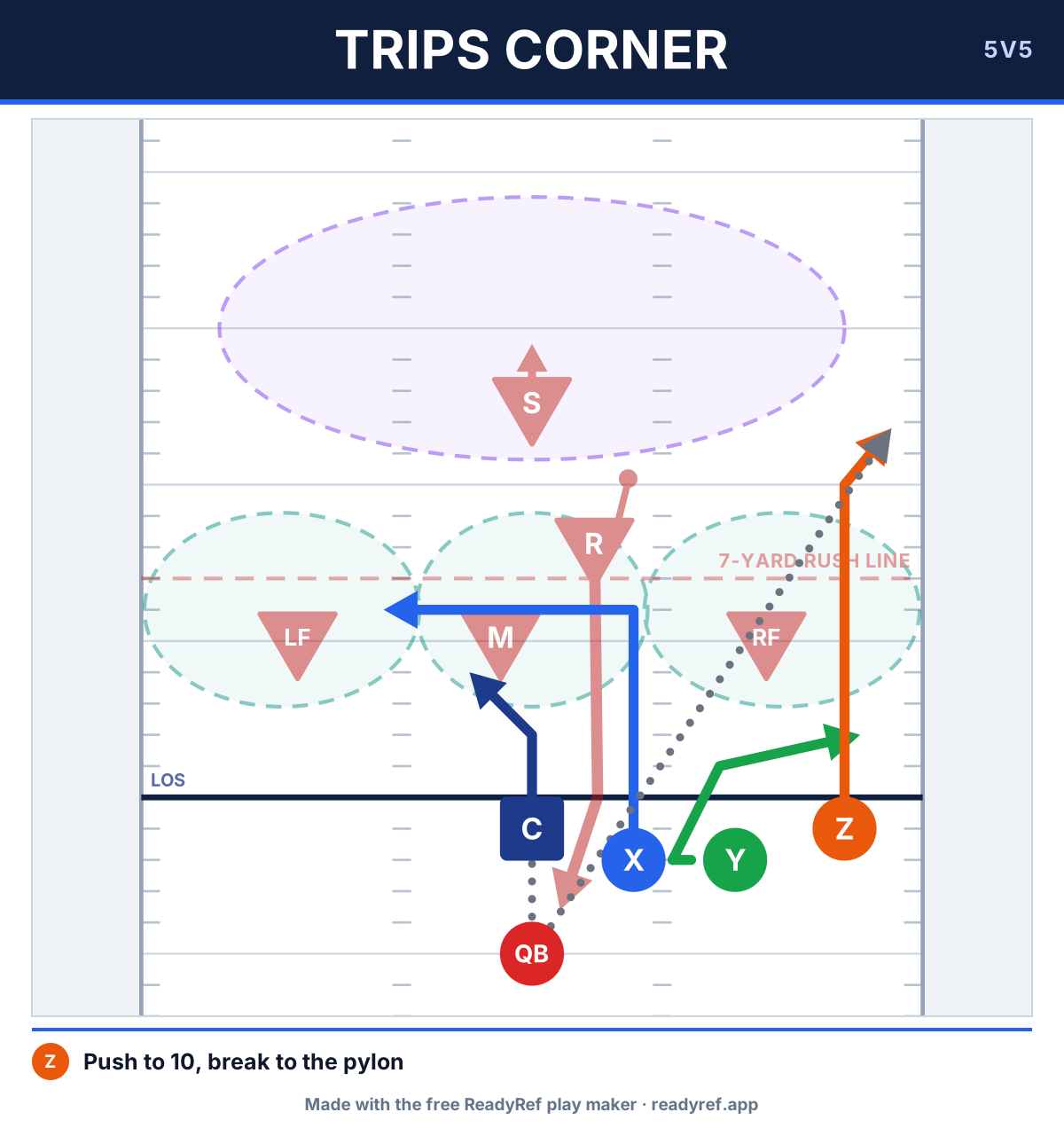
5v5, trips right. Z runs a corner, Y a flat, X a dig. Against a rush 3-1 zone, third and 8. Make me a ReadyRef draft.
Show me how a 7v7 smash concept beats cover 2, then the same play against cover 1 man, as two plays in one draft.
Draw a 5v5 rush 2-2 zone defense against a bunch left formation, with the rusher starting 7 yards off the ball.
Give me three easy 5v5 plays for 8-year-olds: one quick pass, one screen, one deep shot. Keep every route simple.
We're on the 5 yard line, inside the no-run zone. Draw a 5v5 pass play that gets a receiver open in the back of the end zone.
What you get back
With copy and paste, your assistant returns a short explanation and a ReadyRef play code block. Bring the code back to preview the drawing, adjustments and rule checks. Add it to your playbook to watch it run, edit it, print it or save it to ReadyRef.
With the optional connector, the assistant returns a link like readyref.app/draft/…. The draft page shows each play as a sheet your players can read, and runs it against the defense when you tap Watch it run. From there:
- Save to ReadyRef puts the play in your own playbook in the ReadyRef app (sign in, or make a free account). The saved copy is yours and stays after the draft link expires.
- Edit in Play Maker opens the plays in the free play maker, after your own plays, so you can move players, print wristband cards or run Analyze play. It never replaces your playbook.
- How this was checked lists every rules check and what the simulation found.
Draft links last seven days and are unlisted: they aren't shown anywhere on ReadyRef or in search engines, so only people you send the link to will see the play.
How the play is checked
ReadyRef doesn't use AI on its side. Your assistant writes the play; ReadyRef's own code draws it, checks it and runs it, the same code as the play maker. It reports three separate things:
- Does it fit? Code errors block the import and can be copied back to your AI for repair. Adjustments, such as fitting a route onto the field or shortening a callout, appear in the preview for you to accept. With the connector, the assistant must fix them or explicitly accept them.
- The rules. 5v5 and 7v7 plays are checked against the IFAF 2023 rules: lining up behind the line, one player in motion and not toward the goal, the quarterback not running past the line, rushers starting 7 yards back, and the no-run zones. Each check comes back pass, fail or "check this", with the rule number. A play that fails is still made, with the fail shown up front, because house rules differ. For 6v6, every check says to look at your league's rulebook.
- The simulation. The play runs against its defense (or ReadyRef's library defenses) at youth, rec and competitive levels, from both sides of the field, both as drawn and with the quarterback free to throw to the open receiver.
Not checked: contact, screening and shielding, flag guarding, timing (including the 7-second pass clock), the snap, handoff rules, what the defense does after the snap, and pass interference. The simulation is a rough guide to spacing and timing. It doesn't know your players, and doing well in it doesn't make a play legal or good.
Frequently asked questions
Does it cost anything?
ReadyRef's transfer and connector options are free and need no ReadyRef account. Your assistant does the writing on your own plan, subject to its limits. Pasted play code is drawn and checked in your browser; the connector creates a stored draft link.
Which assistants does it work with?
The copy-and-paste option works with ChatGPT, Claude or another assistant that can follow the supplied play instructions and return JSON text. No connector is needed. The optional direct-link flow needs an MCP-capable assistant; tools using HTTP actions can use the OpenAPI description.
How long does the link last?
Connector draft links last seven days. Tap Save to ReadyRef on the draft page to keep a copy. Copy-and-paste play code has no expiry, and plays you add use the play maker's normal browser autosave.
Does opening a draft change my playbook?
No. Opening the link only shows the play. Edit in Play Maker adds the draft's plays after your own (and you can undo it); it never replaces your playbook.
Is the play legal?
ReadyRef checks the parts of the IFAF 2023 rules a drawing can show, such as where players line up, motion, rushers and the no-run zones, and lists anything that fails. It can't see contact, flag guarding, timing or pass interference. For 6v6, every check says to look at your league's rulebook.
What does ReadyRef keep?
For copy and paste, your request type, question, league rules and code stay in this browser tab's session storage, and plays you add use the play maker's normal browser autosave. Only what you paste into your assistant is sent to that assistant. For the optional connector, ReadyRef stores the play, the assistant's name and a scrambled session key used for rate limits, deleted after seven days. No name, email or account is stored with a draft. See the privacy policy.
Can I share a draft with my team?
Yes, anyone with the link can watch the play and save their own copy. To share a whole playbook that lasts, save the plays first and use a team playbook in the ReadyRef app.
Something looks wrong on a draft.
Use the Report form on the draft page, or contact us.
Rather draw it yourself?
The play maker is free in your browser: drag players, draw routes and a defense, watch it run, and print wristband cards.
Open the play maker