
How to watch a flag football game live online
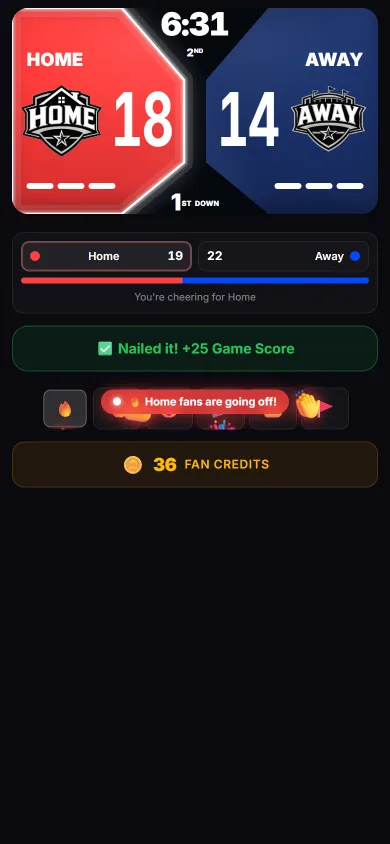
You can follow any ReadyRef flag football game live in a web browser using a 6-character watch code — no app to install and no account to create. The score, clock, downs, and play-by-play update in real time, on a phone, laptop, or TV.
- Every ReadyRef game has a short 6-character watch code and a shareable link.
- Open readyref.app/game/CODE in any browser — nothing to install, no sign-up.
- You'll see the live score, game clock, current down, and a running play-by-play.
- Rotate your phone to landscape for a full-screen TV-style scoreboard.
- No code yet? Open the live demo to see exactly what it looks like.
Step 1: Get the watch code
When a referee starts a game in ReadyRef, it's assigned a unique 6-character code (for example, AXSCVP) and a matching link. The ref or your league usually shares it in a team group chat, an email, or a text. That short code is all you need.
Step 2: Open the live scoreboard
There are two ways in:
- Tap the link, or type readyref.app/game/ followed by the code (e.g. readyref.app/game/AXSCVP) into any browser.
- Or go to the ReadyRef homepage, enter the code in the "Watch a game" box, and tap Watch now.
The live scoreboard opens immediately. There's nothing to download and no account required — it works on iPhone, Android, tablets, laptops, and smart-TV browsers alike.
Step 3: Follow the game in real time
Once you're in, the board mirrors what the referee is doing on the field:
- Score and game clock tick in real time.
- Current period and down show where the game stands.
- Play-by-play log lists touchdowns, conversions, turnovers, and timeouts as they happen.
- Timeouts remaining appear for each team.
On a phone, hold it upright for the scoreboard plus the play log, or rotate to landscape for a clean, full-screen, TV-style board — ideal for casting to a bigger screen at a watch party.
Try it now with the live demo
Want to see it before a real game? Open the ReadyRef live demo — it's a looping simulated game that shows the scoreboard, clock, and play-by-play exactly as a real broadcast looks.
Troubleshooting
"Waiting for the game to start"
The code is valid but the referee hasn't kicked off yet. Leave the page open — it will update automatically the moment the game begins.
The code isn't found
Double-check the six characters (codes are not case-sensitive). If it still doesn't load, ask the ref to re-share the link — a new game gets a new code.
Do I need to pay or sign in to watch?
No. Watching a game in your browser is free and requires no account. (Paid ReadyRef tiers are for referees and league organizers running games, not for spectators.)
Make the call. Test yourself on these rules with the free flag football rules quiz: watch an animated play, pick the call, and see the IFAF rule behind it.
Frequently asked questions
Do I need an app or account to watch a flag football game?
No. Open readyref.app/game/ followed by the 6-character code in any browser — there's nothing to install and no sign-up to watch.
Is watching a live game free?
Yes. Watching is completely free; ReadyRef's paid tiers are for referees and league organizers running games, not for spectators.
Can I watch on a TV?
Yes. Open the watch link in a smart-TV browser or cast it from your phone, then rotate to landscape for a clean, full-screen scoreboard.
 Buyer's guideFlag football scoreboard appsThe features that actually matter on game day — flag-specific rules, live sharing, multi-ref sync, a play log with undo, and league tools.
 League operationsHow to run a flag football leagueChoose a format, build a conflict-free schedule, assign referees, keep standings accurate, and run a playoff bracket — without a pile of spreadsheets.
 OfficiatingHow to referee flag footballA beginner's guide to officiating: the role, pre-game setup, the most common calls, and managing the clock and downs without losing the play.
 Rules & formatsFlag football rules explainedFormats, scoring, downs, no-run zones, rushing the passer, and common penalties — the shared framework behind every league's rulebook.
See it live right now
Open the demo scoreboard, or grab the app to run and share your own games.